E-Commerce Strategies
Amazon sellers face strict rules, and even small mistakes can lead to account suspensions or permanent bans. This guide explains the key reasons for policy violations, how Amazon's enforcement system works, and actionable steps to resolve and prevent issues.
Key Takeaways:
Common Triggers: Selling prohibited items, counterfeit claims, poor performance metrics, or documentation errors.
Enforcement Actions: ASIN suppression, account suspension and deactivation, and permanent bans.
Resolution Steps:
Use the Account Health Dashboard to identify and address violations.
Submit detailed Plans of Action (POAs) with root cause analysis, corrective actions, and preventive measures.
Provide clear, accurate documentation (e.g., invoices, supplier agreements).
Best Practices: Monitor account health daily, respond to violations within 24–48 hours, and ensure supplier and listing compliance.
Amazon's AI-driven enforcement system is fast but often lacks human oversight. Knowing how to navigate violations promptly and professionally is essential for maintaining a healthy seller account.
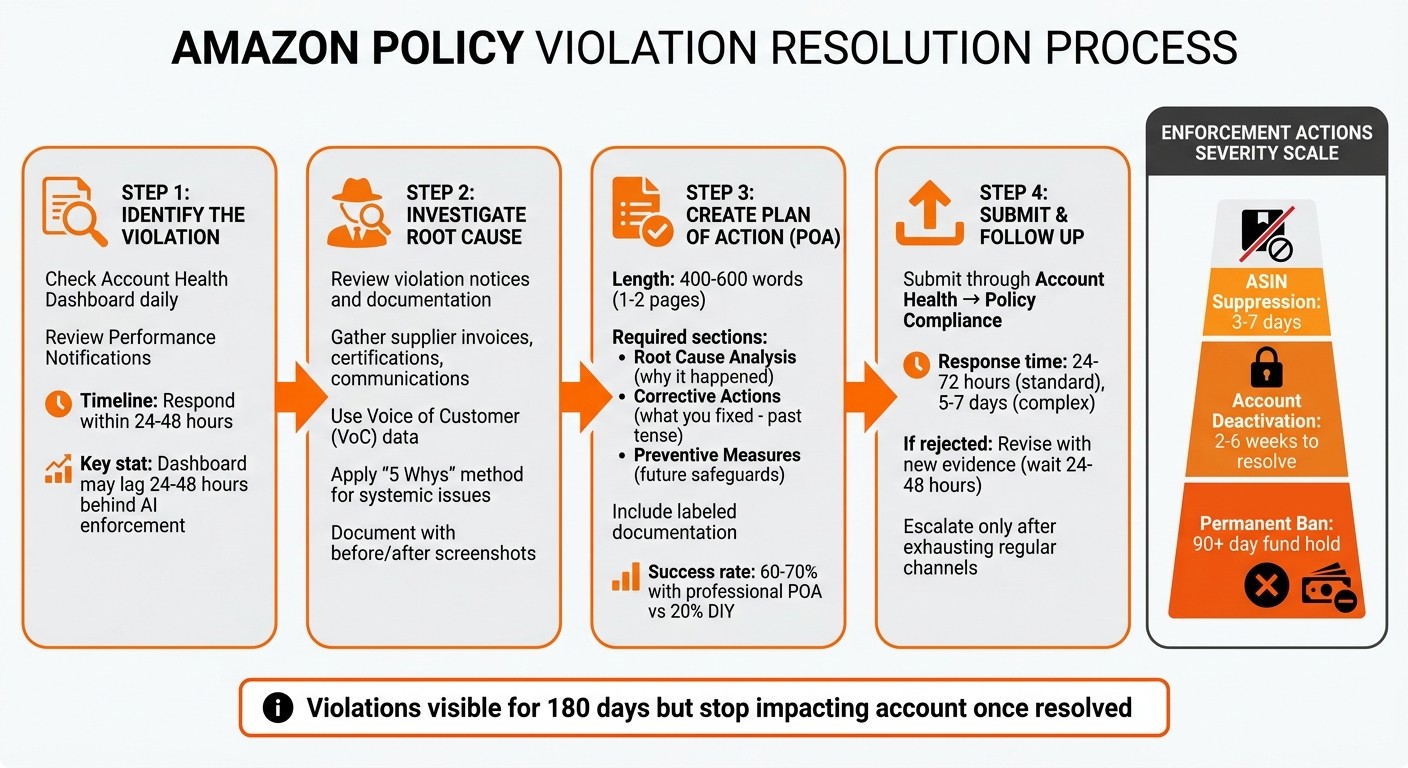
Amazon Policy Violation Resolution Process: 4-Step Guide for Sellers
How to Appeal Amazon Policy Violations Step-by-Step Guide to Reinstating Your Account | 417K Reviews
How Amazon's Policy Enforcement System Works
Amazon's policy enforcement system relies on a combination of AI and human reviews, though the platform has leaned heavily toward AI-driven decisions since 2026. This shift allows for faster suspension actions, often happening without human oversight in the initial stages. Siddharth Sharma of Nventory US explains, "Amazon's AI enforcement system expanded its scope, tightened its thresholds, and started making suspension decisions faster than any human review team ever could."
The AI system continuously monitors account trends, flagging potential issues before they escalate. For instance, if your Order Defect Rate (ODR) is 0.9% but trending upward, the system might trigger enforcement actions - even if the official threshold of 1% hasn’t been breached yet.
Types of Enforcement Actions
Amazon's enforcement measures are tiered, escalating based on the severity and frequency of violations:
ASIN suppression: This action removes product listings from search results and the Buy Box for 3–7 days. Common triggers include non-compliant edits, missing attributes, or intellectual property complaints.
Account deactivation: A more serious measure where selling privileges are paused, and funds are held. This typically happens after repeated violations, fraud flags under Section 3, or failure to meet performance metrics. Resolving these cases can take 2–6 weeks, depending on the complexity and the quality of your Plan of Action.
Permanent bans: Reserved for severe cases like confirmed fraud or failed appeals, this results in account closure, funds being held for at least 90 days, and related accounts being flagged. A policy update on March 4, 2026, also introduced API access suspension for sellers using unauthorized automation tools, forcing manual account management for 2–4 weeks or longer.
These enforcement actions have ripple effects beyond account access. For example, FBA inventory is frozen during suspensions, leading to stockouts across other channels. Even after reinstatement, violations can damage your search rankings and Buy Box eligibility.
Where to Find Violation Notifications
The Account Health Dashboard (AHD) in Seller Central is your go-to tool for tracking policy violations. Located under the Performance menu, the AHD provides detailed information and actionable next steps for each violation. Notifications are also available in the Performance Notifications section, but the AHD offers a more comprehensive view.
Violations remain visible on the dashboard for up to 180 days, though they may stop impacting your account standing once corrective actions are taken. However, timing is critical: the dashboard often lags behind AI-triggered enforcement actions by 24–48 hours. This means you might receive a suspension notice before the violation appears in the AHD.
Manny_Amazon, a Community Manager, stresses the importance of addressing violations promptly: "When you see a policy violation in your Account Health Dashboard, it's not just a warning - it's a specific signal about what needs to change." Each violation includes a "Next Steps" column with guidance, but sellers must investigate further to uncover the root cause.
Violation Categories and Response Timeframes
Violations are grouped into categories like Intellectual Property (IP) complaints, Product Authenticity, Product Condition, Safety, Listing Policy, Restricted Products, and Customer Product Reviews. Each category has specific triggers and documentation requirements.
Timely responses are critical. While standard appeal reviews take 5–7 business days, compliance document reviews can take 10–15 business days. However, your initial response should be submitted within 24–48 hours to maximize resolution options and prevent escalation. Cooper_Amazon notes, "The Compliance Team takes anywhere from 10 to 15 business days to review documentation submitted through the Product Compliance Dashboard in Account Health."
Section 3 violations, which cover fraud and abuse, increasingly require video verification during appeals. This can extend resolution times to 30 days or more. While this added scrutiny helps maintain marketplace integrity, it also means sellers must prepare comprehensive documentation upfront. Professional Plans of Action have a much higher success rate - leading to reinstatement 60–70% of the time compared to just 20% for DIY appeals. This highlights the importance of getting your response right from the start.
Understanding these timeframes and processes is essential groundwork for identifying the causes of violations.
Identifying the Root Cause of Policy Violations
When it comes to Amazon appeals, guessing won't get you far. It’s crucial to pinpoint the systemic issue behind the policy violation - not just the surface-level problem. Amazon’s enforcement team wants a thorough investigation into what actually caused the issue. This step is often the difference between an accepted or rejected appeal. Understanding the root cause also helps you make the right corrections, which we’ll cover in detail later.
How to Review Violation Notices and Documentation
Start by navigating to the "Policy Compliance" or "Violations" section in your Account Health Dashboard. Here, you’ll find details about the flagged policy and affected ASIN(s). Read the notice carefully - it will specify whether the issue involves intellectual property, product authenticity, or a listing policy violation.
Once you’ve reviewed the notice, gather all related documentation for the flagged ASINs. This might include supplier invoices, manufacturer communications, product certifications, and even customer correspondence. Cross-check these records against the notice to figure out whether the issue stems from a listing error, supply chain problem, or customer complaints. Be sure to document your corrections with before-and-after screenshots for clarity.
Make it a habit to check your Account Health dashboard daily. This ensures you catch new notifications or requests for additional information quickly. And when submitting appeals, always use the specific "Appeal" button next to the violation. This ensures your case goes to the right team, avoiding delays caused by routing it to general support.
Common Reasons for Violations
Some violations are more common than others. For example:
Variation policy abuse: This happens when unrelated items are grouped together, like listing a charger and cable as color variations, or when variation themes are misused (e.g., listing different phone models under a "color" attribute).
Sales manipulation: This includes incentivizing reviews, using bots to boost web traffic, or artificially increasing sales rank.
Even if you weren’t directly involved, Amazon holds you accountable for violations caused by third-party partners with access to your Seller Central account.
If a violation notice seems unclear, use the "Call me now" button on the Account Health page. Speaking directly with an Account Health Specialist can save you valuable time and clarify the issue.
Using Voice of the Customer (VoC) Data
Amazon’s Voice of the Customer dashboard is an invaluable tool for identifying trends that might explain why your account was flagged. High return rates, negative reviews, or recurring complaints often hint at authenticity or condition issues before they escalate into formal violations.
To dig deeper, use the "5 Whys" method to uncover the root cause. For instance, if customers report defective products, ask why. Maybe it’s due to poor packaging during shipping. Why? Because the warehouse didn’t follow proper packing protocols. Why? Staff weren’t trained on updated procedures. This kind of process-level failure - not just the defective product itself - is what Amazon considers the root cause.
Focus on systemic or process-related issues rather than stopping at surface-level symptoms. For more complex cases involving multiple failures - like a listing error combined with a supplier issue - address each problem individually in your Plan of Action. This demonstrates a comprehensive understanding and commitment to resolving the issue, setting the stage for an effective appeal in the next steps.
Writing an Effective Plan of Action (POA)
Once you've pinpointed the root cause of your violation, the next step is crafting a precise and focused Plan of Action (POA). This document should clearly explain how you’ll fix the problem, demonstrate control over the issue, and outline steps to ensure it doesn’t happen again.
Required Components of a POA
Your POA should include three main sections: Root Cause Analysis, Corrective Actions, and Preventive Measures.
Root Cause Analysis: Explain why the violation occurred - not just what happened. For example, instead of saying, "customers received inauthentic products", dig deeper: "Our supplier vetting process lacked proper verification for manufacturer authorization letters, leading to sourcing from an unauthorized distributor."
Corrective Actions: Detail the immediate steps you’ve already taken to address the issue. Use past tense to emphasize actions already completed. For instance:
"Removed all affected ASINs from inventory."
"Issued full refunds to 47 affected customers."
"Terminated the relationship with the unauthorized supplier on April 15, 2026."
Preventive Measures: Focus on long-term solutions to avoid future violations. This section should include specific responsibilities and verification methods. For example: "Implemented a three-step supplier verification process overseen by our Compliance Manager, including quarterly audits of authorization letters and monthly spot-checks of inventory batches."
What Documentation You Need to Include
The supporting documents you attach will depend on the type of violation. For intellectual property concerns, include proof of Amazon Brand Registry benefits, manufacturer authorization letters, and supplier contracts that confirm your status as an authorized reseller. If the issue involves authenticity, provide supplier invoices, compliance certificates, or quality control logs.
Make sure your documentation is labeled clearly, such as "Invoice_SupplierName_04152026.pdf", and double-check that all identification documents match your seller profile. Cross-reference these materials in your POA to reinforce your claims.
Writing Style and Presentation Guidelines
Your POA should be concise - ideally one to two pages. Focus on clarity and structure. Use headings for the three main sections and bullet points to help Amazon’s investigators quickly grasp the key details. As Enrico Schaefer, Founding Partner of Traverse Legal, advises:
"A POA is an operational document. It should read like a tight internal compliance report. It should state what broke, what you changed, and what prevents repeat errors."
Adopt a factual tone and take full responsibility. Avoid blaming Amazon, customers, or third parties. Steer clear of emotional language or filler phrases. For example, instead of saying, "We sincerely apologize and promise this will never happen again", write: "We identified a gap in our quality control and implemented a new inspection protocol on April 18, 2026."
Amazon typically responds within 48 hours, though more complex cases may take longer. Submitting your appeal within 48–72 hours of receiving the suspension notice shows urgency and accountability. A clear and well-structured POA lays the groundwork for a successful appeal.
Submitting and Following Up on Your Appeal
How to Submit an Appeal Step-by-Step
Start by logging into Seller Central and finding your violation under Performance Notifications or Account Health. Before you even think about submitting your appeal, address the root cause of the problem. This could mean removing problematic listings, fixing internal processes, or updating supplier documentation. Take screenshots of the changes you've made as proof.
Next, gather all the necessary supporting documents. This might include invoices, supplier agreements, authorization letters, or certifications. Be sure to label your files clearly (e.g., "Invoice_SupplierName_04-15-2026.pdf") to make them easy to identify. Once you're ready, navigate to Account Health → Policy Compliance and click Appeal next to the relevant violation. Submit your Plan of Action (POA) along with the supporting documents through the provided interface. Typically, Amazon responds within 24 to 72 hours, but more complex cases might take longer.
Best Practices for Appeal Content
Keep your appeal concise but thorough - aim for 400 to 600 words. This length allows you to cover all three sections of your POA while making it easy for Amazon's investigators to review quickly. Use headings and bullet points to make your document easy to scan. As Noah Wickham, VP of Sales and Marketing at My Amazon Guy, explains:
"A strong POA is crucial for showing Amazon that you are a responsible seller and ready to comply with their policies."
Avoid resubmitting the same appeal if it gets rejected. Instead, revise your POA with updated evidence and fresh language. If Amazon's rejection notice points out multiple ASINs or violations, address each one individually with new evidence and tailored explanations.
If your revised appeal still doesn't get results, it may be time to escalate the issue.
When and How to Escalate Appeals
If your appeal is rejected without clear feedback or you don’t hear back within 5 to 7 business days, consider escalating. Start by carefully reviewing the rejection notice for clues about missing or improperly formatted documents. Before resubmitting, wait 24–48 hours to reassess your approach. Rushing could trigger a cooldown period, delaying responses for up to 30 days.
Reach out to the Account Health team through the Seller Central Case Log for further assistance. Be patient and avoid frequent follow-ups while your case is under review. As Anastasia, an Amazon account reinstatement specialist at Mr. Jeff AMZ, advises:
"As a last resort, you can escalate to Amazon's executive team, but only after exhausting regular channels and ensuring your appeal is bulletproof."
Stay on top of your Account Health dashboard for updates. If you suspect that an issue related to FBA inventory contributed to the violation, request a bin check and include the resulting case ID in your appeal. This additional step can sometimes help clarify the situation and strengthen your case.
Solutions for Common Violation Types
Let’s dive into some targeted ways to tackle frequent violation types on Amazon.
Fixing Intellectual Property Violations
First, determine the type of intellectual property (IP) claim - whether it’s related to a trademark, copyright, or patent. Each type comes with specific evidence requirements. Amazon’s "notice and takedown" system removes listings immediately after a complaint is filed through Brand Registry, leaving you responsible for proving your case.
Here’s how to handle it:
Trademark claims: These often involve unauthorized use of brand names, logos, or counterfeit accusations. Provide invoices from authorized distributors, Letters of Authorization (LOA), or photos of authentic packaging.
Copyright claims: Typically arise from using someone else’s images, text, or marketing materials. You’ll need original high-resolution photos with metadata, licensing agreements, or, if necessary, file a DMCA counter-notice. This counter-notice asserts under penalty of perjury that the removal was a mistake. The complainant then has 10 to 14 business days to take legal action, or Amazon will usually reinstate your content.
Patent claims: These involve overlaps in product design or functionality with an existing patent. Required evidence includes claim charts comparing your product to the patent, court orders, or documentation of design changes.
Keep thorough documentation on hand, such as itemized invoices from the last 365 days, and take screenshots of your listing, packaging, and Amazon’s performance notification before making any changes.
"IP complaints are serious, but they're also one of the most resolvable issues sellers face on Amazon." – Sarah Mitchell, aSellingSecrets
IP Violation Type | Common Triggers | Required Evidence for Appeal |
|---|---|---|
Trademark | Brand names in titles/keywords, logo misuse, counterfeit claims. | Invoices, LOAs, authentic packaging photos. |
Copyright | Using others' images or text, brand marketing materials. | High-res photos with metadata, licensing agreements, DMCA counter-notice. |
Patent | Product design or functional overlap with patented inventions. | Claim charts, court orders, or design change records. |
Solid documentation is your best ally when appealing these claims.
Responding to Authenticity Concerns
Authenticity issues are another frequent challenge. Amazon uses "inauthentic" as a broad term - it could mean counterfeit goods, irregular supply chains, or even confusion caused by poor product images or packaging changes. These flags can stem from customer complaints, rights owner allegations, or automated checks on your invoices and sourcing.
When appealing, you have two options:
Prove authenticity: Submit invoices and LOAs that match your seller details, along with high-resolution photos of your product packaging. Make sure UPC codes and SKU labels are clearly visible.
Acknowledge the issue: If your sourcing documentation is weak (e.g., retail arbitrage or purchases from resellers), admit the violation and outline corrective actions.
In 2025, about 33% of these cases were resolved on the first appeal, while nearly 50% required escalation to senior Amazon teams. If your invoices are rejected, you can use a "Future Inventory" strategy: remove the flagged ASIN, admit the violation, and submit invoices for new, authorized inventory (at least three products, 10 units each) along with a detailed one-year business plan.
If outdated images or listing errors caused the issue, update your listing as part of your Plan of Action (POA). Quick and clear responses are crucial.
Resolving Product Eligibility Issues
Product eligibility issues often arise from Amazon’s automated systems, which flag listings based on specific keywords or unusual sales patterns. Even products without prior problems can get flagged. Common triggers include promotional samples, items nearing expiration, or products with legal restrictions.
To resolve these issues:
Review the violation notice to identify the problem - whether it’s a keyword or missing certification.
Submit the required documentation for your product category. This might include:
Safety Data Sheets (SDS) for hazardous materials
Third-party testing documents for dietary supplements
FDA registration for medical devices
EPA registration for pesticides
Children's Product Certificates (CPCs) for toys
If you believe your product was flagged in error, reach out to Seller Support with proof of compliance. To avoid future problems, remove "trigger words" from your product titles and descriptions that could confuse Amazon’s systems. While policy violations stay visible for up to 180 days, they stop impacting your account once resolved. Aim to respond quickly - ideally within 12 to 24 hours for serious issues.
Conclusion
Staying compliant on Amazon is about being proactive, not just reactive. Regularly check your Account Health Dashboard to spot potential issues before they spiral. Keep your supplier invoices, Letters of Authorization, and safety certificates neatly organized, so you can respond to requests within 12 to 24 hours when needed. Remember, while violations can linger for up to 180 days, resolved issues no longer negatively impact your account.
Fast problem-solving depends on having solid documentation and acting quickly. Avoid using risky language in your listings, research product history thoroughly before sourcing, and stick to Amazon's official "Request a Review" button for feedback instead of personal outreach. If violations arise, focus on fixing the root cause first. Document every correction with screenshots, and submit a clear, factual Plan of Action. This structured method follows the steps discussed earlier in this guide.
"A healthy account with good performance metrics increases the chances of winning the Buy Box and your eligibility to sell specific products, including restricted categories hence growing sales." – Patricia Lewis, Content Writer, Seller Assistant
When managing compliance becomes too overwhelming, seeking expert help can be a game-changer. Balancing compliance while scaling your business is no small task. That’s where professional support comes in. eStore Factory specializes in Amazon account management and policy compliance. They assist sellers in creating effective Plans of Action, organizing critical documentation, and establishing preventive measures to safeguard accounts for the long haul. With experts handling your performance notifications, you can dedicate more time to product research, inventory planning, and growth strategies instead of constantly dealing with policy challenges.
Long-term success on Amazon depends on consistent compliance. Whether you manage it yourself or rely on professionals like eStore Factory, keeping your account healthy is the key to winning the Buy Box, accessing restricted categories, and growing your business profitably.
FAQs
Why did Amazon suspend my account if my metrics are still under the threshold?
Amazon has the authority to suspend accounts even when performance metrics seem satisfactory. This can happen due to policy violations, risk indicators, or alerts from automated systems. Common triggers include linked accounts, unusual activity, or irregular selling patterns. The platform takes these measures to uphold compliance and maintain trust among users. It’s a reminder that sellers must adhere to Amazon’s policies, not just focus on meeting performance standards.
What documents are most likely to get an appeal approved?
A strong appeal starts with a well-structured Plan of Action (POA). Your POA should clearly address three key areas: the root cause of the issue, the corrective actions you've already taken, and the steps you'll implement to prevent similar problems in the future.
To make your appeal more persuasive, back up your POA with relevant evidence. This could include documents like invoices, supplier communications, or product certifications. These materials help demonstrate your commitment to resolving the issue and adhering to necessary standards.
When should I escalate after an appeal is rejected or ignored?
If your appeal is turned down or ignored, even after you've taken corrective steps, and the issue remains unresolved, it’s time to escalate. This is especially important if you believe the violation is incorrect or if you’ve gathered new evidence to support your case.
To escalate, stick with Amazon’s official channels, such as Seller Support or higher-level support tiers. Consistent and persistent follow-up is essential to ensure your case receives the attention it deserves.